Showing posts with label Facebook. Show all posts

Monday, 25 April 2016

How to secure your fb account from Hacker

                       
There are to lose contact Facebook account. You may get hacked and ultimately loose Control over your facebook account Certainly this is not the end of the world, but be aware that you can also be the victim of an attack by malicious softwares and hackers causing much more damage on your Facebook account. It is very important toPrevent Fb Accounts from Being Hacked.Indeed , while no software installed on your local system, there is nothing that your local antivirus can detect and your account may be hacked in one-of- hand trick, leading to all sorts of hassles and problems . So today in this article we willdiscuss some Basic Tips to Prevent Fb Accounts from Being Hacked. Tips to Prevent Fb Accounts from Being Hacked

1)Application Permission Whenever on Facebook you answer a quiz , install a Facebook game, or add any application , you will be forced to go through an intermediate screen showing what the permissions the application needs . These permissions can include almost anything, which may also include full access to your Facebook account , even when you’re not connected. In other words, if you do not carefully read the permissions required , you might end up giving more than just personal information, so beware next time and Prevent Fb Accounts from Being Hacked!

2) Spammy Video links: Also Beware of videos on Facebook, Spammers are targeting Facebook to Spread links of Spammy videos, Which on your click redirects you and takes control of your fbaccount to Spam on other fb comments, you might not be even aware that you have commented so and so thing on so and so palce.

3)Download Notification: Sometimes when you start a video , you receive a notification that you need to install or update a codec , which is necessary and essential to watch the clip. That may be true, but its often said that codec is actually a Trojan horse . For those who do not know , be aware that antivirus program is blocking it , although it could still slip through the net and suddenly be harmful for you. So be very smart when you come accross this situation and Prevent Fb Accounts from Being Hacked.

 4) Message from Facebook: If you own Popular Facebook pages, then you may even recieve Messages with names like : Facebook team, Security team, Facebook Security, etc, etc. The Message would so legit thatyou will be Forced to click on Some link, Which are actually Cookie stealing apps and eventually you may end up loosing your facebook account so better ignore that message and Prevent Fb Accounts from Being Hacked. No Facebook team will never Send you such messages, so Dont forget to Report that message. Protect Yourself: Facebook continues to work on security even within its platform,but the social giant can not help you to provide your personal information to playa game or a quiz . In addition, a local antivirus will not prevent this error. Ultimately it is up to you to pay attention and Prevent yourself: Add your phone number and Change its privacy to Only me, So Even if there is any problem in your fb account you may easily get it back by making facebook send you Codeto your Mobile. And Changing your Phone number Privacy to Only me Will make sure that other people will not be able to see your Phone number. Add Security Question as a Secondary optionto get back your Facebook account. Choose a Question, Answer to which only you know. or add any other Unique answer which nobody knows but make sure you are able to remember it. Add People as Friends that you know personally, Many a times people on facebook adds many other people who they dont even know by thier face. Facebook Asks you to identify Friends inwhich they are Tagged in. Turn on Notification when you log in to your facebook account, so whenever you login, you get a mail from facebook with information about time, date, Operating system and Browser. Change your Password Frequently, It is said that you must Use your Password as your Toothbrush. So keep changing it Frequently to Prevent Fb Accounts fr

Sunday, 24 April 2016

How to Change Background, theme Color Of facebook

Hello friends, a very warm welcome to my blog So today I teach you this is updated post.
Now a days many Facebook users wants this type of new Facebook feature that's why today I post this. So lets move on to post topic whichis given below. how to change Facebook timeline background theme colorSo lets move on to post topic which is given below.

how to change Facebook timeline background theme color For your information "Facebook Theme Creator" is a Google chrome extension and "My Theme For Facebook" is a Mozilla firefox Extension, So with the help of this given two extensions you can change Facebook timeline Background theme color, because in thisextensions there are many different Facebook themes and you can apply anytheme according to your choice.

HOW TO CHANGE THEME

:-Download Given below extension according to your browser.

for google chrome :-Download here

for mobozila:- Download here

HOW TO USE THIS EXTENSION FOR CHROME

:-For installing these extension according to your browser where you use this trick click on " ". + Free After installing this extension will add in your browser. For use this Chrome extension, it will tells you to sign in Google chrome after that you change background theme,appearance and bar color. for use this extension it will install a app in your FB apps, So finally click on "themes creator app" then you apply any design which you want.

HOW TO USE THIS EXTENSION FOR MOZILLA

:-After installing Mozilla extension a icon will appear on the top right side corner on your Facebook page. So simply Click on that icon and then it will show you a dialogue box from where you can change your Facebook theme

.NOTE:- If you want to Remove these extensions then Go to your Google chrome browser>Settings>Extensions> and tap on "Disabled" or Also you can delete this extensions.

Friday, 22 April 2016

How to make Jungli stylish id in Facebook


100% WORKING JANGLI NAME TRICK
.
STEP-1.
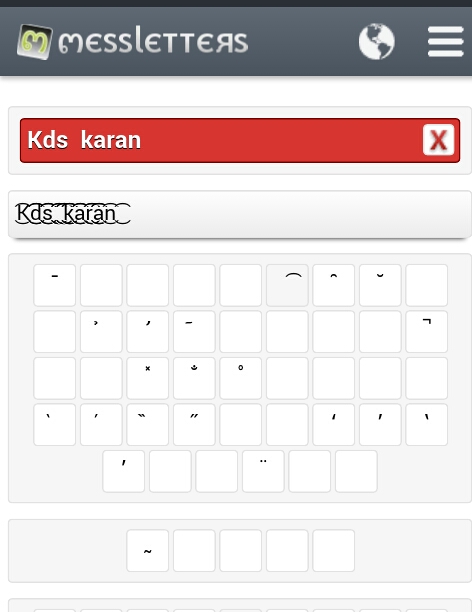
Sabse pehle Is Link Par Jao..Aur Name Stylish Karo...Aur Usko Copy Karo.
                         Messletter Text
                   
STEP-2.
Ab aap VPN HOLA ya TUNNEL BEAR VPN open kijiye

STEP-3.
Ab Hamen Country Select Karni Hai Ab Ap "Spain or Netherland" Country Select Karen

STEP-4.
ab aap Jo jangli name bana kar copy kiya tha use dalkar apna name change kar lijiye
ab Apka JUngli Style Name Ban Gaya
.
Trick pasand aaye to Share kare :D

Open Friends Facebook id without knowing his Password

                                 
»Open Your Friends FaceBook Id Without Password Open Your Friends Facebook Without password, Now I share how to open your friends fb accounts without know their password lets

start:- Firstly give your memory card to your friend... say your friend to "browse fb"then buy and put that sdcard in your mobile, then open uc handler v7.6 then open facebook, now it dont asking login, directly goto facebook homepage Your Friends Id Log In Automatically...! now you also able to change tha password

How to change your Date of birth after Limit


ITS NOT SO HARD, ITS AN OFFICIAL TRICK OF FACEBOOK. YOU CAN CHANGE YOUR BIRTHDAY AFTER LIMIT

                  Click here to Change your Date of birth

NOW GIVE A VALID REASON. AND CHANGE YOUR BIRTHDAT
         Enjoy

How To Automatically Post Birthday Wishes On Your Friends Facebook Wall


The method is very simple and easy and in this you will schedule all your greetings post on the friends waal whose birthday is coming up and facebook will Automatically Post Birthday Wishes On Your Friends Facebook Wall. To implement this follow up the below

steps. 1. First of all visit the website www.BirthdayFB.com

2. Now you see , Click on Connect To Facebook there

3. Now it will ask you for the access permission, click on okay.

4. Now you will see the friends list that are having birthdays in the coming days.

5. Click on the down arrow type there your greetings for your friend and then schedule the message.

6. Thats it you are done, Now this site will automatically post the birthday greeting to your friends that you have scheduled in it.

Thursday, 21 April 2016

Govt.Id Card for Id Verification.

Ab aap Is proof ko use kr sakte ho apni id verification krne ke liye 100% working hai...
Aap proof ko Picsart or Phonto App se edit kr sakte hain....

                                            For India Proof


   For Pakistan proof


       Enjoy :-) :D

How to Activate bot Comments In your Facebook Id

There are lot of bot sites which do this job , but all of these sites are temporary and removed by Facebook after some time , so these are not permanent , we have to search these bot sites .
                 
To Active Bot Comments Follow blew steps......

Step-1.. Click here to active bot
                  Bot Commenter

Step-2.. Now login your facebook id password
                           
Step-3..Now Activate Bot Comment by Click on Submit ..........
                      Enjoy Keep Sharing :-)        

Wednesday, 20 April 2016

How to verify Active/Logged Fb account. 100% Working


HAAN AAJ BTATA KESE FB ID KO BINA BLOCK OR REPORT KIYE VERIFY KRNE KA METHOD.
STEP - 1. SBSE PEHLE ES LINK KO OPEN KRO Link
STEP - 2. NOW APNA CLEAR GOVT PROOF KA PIC UPLOAD KRDO YNHA
STEP - 3. AB WAIT KRO FB KE REPLY KA. 24 HOURS KE ANDR ANDR FB KA REPLY SUPPORT INBOX ME AA JATA HE.
NOTE - . FIRST OF ALL TOH APKI ID OR JO PROOF UPLOAD KRRE HO DONO ME DEATILS SAME HONI CHAHIYE. I MEAN DATE OF BIRTH AND NAME SAME 2 SAME FB ID SE MATCH KRNA CHAHIYE. 2ND PROOF KO EKDAM CLEAR AND REAL JAISA HONA CHAHIYE. VRNA FB ACCEPTED NHI KREGA. -----THanx 4 visiting----- :D

HOW TO CREATE SINGLE NAME FACEBOOK ID LATEST METHOD 2016

STEP 1:- SABSE PEHLE ID OPEN KARO FIR SETTING ME JAO

STEP 2:- FIR TAMIL LANGUAGE SELECT KIJIYE

STEP 3:- USKE BAD FIRST NAME ME NAME DALO AUR LAST NAME KO KHALI CHOD DO ,SAVE KIJIYE USKE BAD DONE HO GAYA
ENJOY

List of Disposable Email to Make FB without Number.

http://mailinator.com

https://www.guerrillamail.com

http://getairmail.com

http://www.yopmail.com/en/

http://10minutemail.com/

10MinuteMail/index.html

http://www.dispostable.com/

http://www.fakeinbox.com/

http://www.fakemailgenerator.com/

http://tempmail.org/

https://www.sharklasers.com/

http://www.jetable.org/en/index

http://www.throwawaymail.com/

https://trashmail.com/

http://maildrop.cc/

http://www.incognitomail.com/

http://mailnesia.com/

http://www.eyepaste.com/

http://disposable.pingfu.net/

http://discard.email/en/

http://lazyinbox.com/

 http://forward.cat/

http://deadaddress.com/

http://www.mytrashmail.com/


Enjoy ....